

Introduction
This is a self-study document covering the following three books by Peter Shirley et al.:
- Ray Tracing in One Weekend (v3.2.3)(v.4.0.2)
- Ray Tracing: The Next Week (v3.2.3)(v.4.0.2)
- Ray Tracing: The Rest of Your Life (v3.2.3)(v.4.0.2)
Ray Tracing in One Weekend is a well-known resource for hands-on programming practice. The original is written in a solid, not particularly modern style of C++11 (using std::shared_ptr). It is widely referenced as a learning resource for both ray tracing and C++, and also serves as a convenient base for porting to other languages. Many people have attempted implementations in popular languages such as Go and Python, and a fair number of brave souls have tackled Rust — a systems programming language notorious for its steep learning curve.
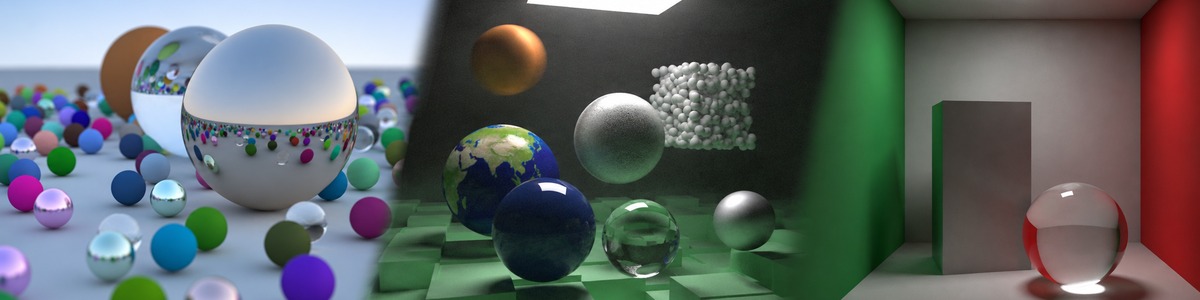
I decided to re-implement it in Rust as well. On top of that, I compile the code to WebAssembly so it runs client-side in the browser, and I display the resulting PPM images inside VitePress using a Vue component. Despite the "One Weekend" in the title, I was nowhere near finished in one weekend — it took me about 7 months (30 weeks) to produce the final scene shown in the banner. The final chapter, "The Rest of Your Life," was so profound that I genuinely felt it would shape the rest of my life.
This project required overcoming several hurdles. I have therefore written a separate section explaining how to work with WebAssembly inside VitePress. Starting from scratch with Vue and Vite, I designed a system that displays output to a Canvas via a WebAssembly binary, and I still remember the excitement of seeing that first gradient image appear.
One pleasant side effect of choosing Rust is the compact WASM binary size. raytracing_demos_bg.wasm, which contains all Week 1 demos, weighs in at just 66 KB uncompressed. Rust's zero-cost abstractions and wasm-pack's release build aggressively eliminate dead code, which neatly illustrates how well Rust and WebAssembly complement each other. At this size, loading the binary has no meaningful impact on page load time with today's network conditions.
Structure of This Document
0. Technical Chapters
Two pages cover the technology needed to call raytracing_demos from VitePress. The first page addresses the three-layer Cargo workspace structure (common, r1XX-*, raytracing-demos), crate naming conventions, the procedure for adding a new demo, the build process, and the design rationale behind passing PPM strings from Rust to JavaScript. The second page covers the Vue component PPMRenderer, which receives those PPM strings and draws them to a Canvas inside VitePress, including how the conflict with Vue's reactivity system was resolved.
1. Ray Tracing in One Weekend
All 13 chapters of Week 1 are covered in order. The original book is written in C++11, and understanding the differences between C++ and Rust is one of the key learning axes of this document. Topics include: representing return values with Option<T> instead of output parameters; using Arc<dyn Trait> instead of shared_ptr; defining pure virtual functions as traits; operator overloading; expression-oriented control flow; and Rust's ownership and borrowing rules — all explained alongside comparisons with their C++ equivalents.
2. Ray Tracing: The Next Week
The second book builds on the common/ crate developed in the first book and adds the features needed to render more elaborate scenes. Its chapters cover motion blur with time-aware rays and MovingSphere; faster intersection tests using BVH with Aabb and BvhNode; solid textures, UV coordinates, Perlin noise, and image textures; emissive materials and axis-aligned rectangles; boxes and instance transformations with Translate and RotateY; constant-density volumes; and a final scene that combines all of these features.
3. Ray Tracing: The Rest of Your Life
The third book develops the Monte Carlo foundations of ray tracing and proceeds to importance sampling, which reduces estimator variance by choosing more effective sampling distributions. Starting with one-dimensional integration and random directions on a sphere, it introduces scattering PDFs, cosine density, orthonormal bases, direct light sampling, and mixture PDFs. The implementation adds the Pdf trait with CosinePdf, HittablePdf, and MixturePdf, then uses ScatterRecord to organize diffuse scattering, specular reflection, and refraction. These techniques are integrated into a Cornell box containing a white box and a glass sphere, with a native parallel renderer producing the final high-resolution image.